
As an Amazon Associate, we earn from qualifying purchases. This post contains affiliate links – if you buy through them, we may earn a commission at no extra cost to you.
Finding the best smart switches for multiple locations for your home depends on your existing wiring and the smart home ecosystem you already use. Some homes have a neutral wire in the wall, while others do not, which dictates whether you need a specialized solution or a standard Wi-Fi switch. You must also decide if you prefer a hub-based system for maximum reliability or a direct Wi-Fi connection for easier setup. If you want a system that works even when your internet is down, look toward hub-based kits, while those prioritizing universal compatibility often lean toward modern standards like Matter.
| Best Choice | |||
| Preview |  |  |  |
|---|---|---|---|
| Product | Lutron Caseta Smart Switch | Tapo Smart Switch S515 | Meross Smart WiFi Switch |
| Brand | Lutron | Tapo | meross |
| Best for | Best Overall Reliability | Best Matter Compatibility | Best HomeKit Integration |
| The listing says | Mount Pico remote anywhere Compatible with Alexa, Apple HomeKit, Google Home | Supports 3-way, 4-way, and single-pole lighting Matter-certified for major smart home platforms | Neutral wire required for installation Replaces one traditional 3-way switch |
| More information | Buy on Amazon | Buy on Amazon | Buy on Amazon |
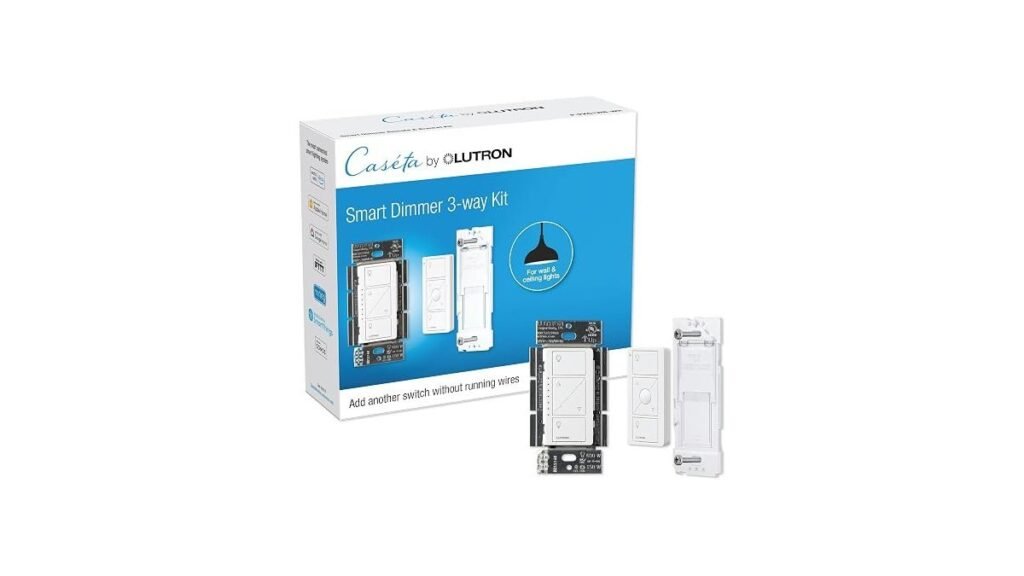
1. Lutron Caseta 3-Way Smart Dimmer Kit; LED Dimmer
Best for: Homeowners who prioritize rock-solid reliability and a hub-based ecosystem.
The Lutron Caseta system is designed for those who want their lights to work every single time they press the button. Because it uses a proprietary hub, it stays connected even if your Wi-Fi signal drops or becomes unstable. The installation process is unique because it doesn’t require a neutral wire, which is a major advantage for older homes where that wire might be missing.
The system relies on the Pico remote to provide multi-location control. You can mount these remotes anywhere, giving you the flexibility to add a “switch” to a wall without needing to pull new electrical wires. This product isn’t for the user who wants to avoid buying an extra piece of hardware, as the Lutron Hub is required for all advanced features.
Good if:
- You live in an older home without neutral wires.
- You want a system that works independently of your Wi-Fi.
- You need the flexibility to mount a remote on any surface.
Skip it if:
- You’re strictly against adding a hub to your router.
- You want to manage your budget by avoiding extra hardware purchases.
2. Tapo Smart Switch S515
Best for: Users who want future-proof compatibility with the Matter standard.
The Tapo S515 is built for the modern smart home that uses various platforms like Alexa, Siri, and Google Home simultaneously. By being Matter-certified, it ensures that your devices can talk to each other regardless of the brand, making it a flexible choice for growing households. It also includes energy monitoring, which helps you track how much electricity your lights are using in real-time.
This switch requires a neutral wire and a 2.4GHz Wi-Fi connection, so you should check your electrical box before you start. It isn’t for users who lack a neutral wire in their wall box, as this is a strict requirement for installation. The unit is built with flame-retardant materials to ensure safety during daily operation.
Good if:
- You want to use the latest Matter smart home standard.
- You need to track energy usage to stay eco-conscious.
- You use a mix of different voice assistants in your home.
Skip it if:
- Your light switch box doesn’t contain a neutral wire.
- You don’t have a reliable 2.4GHz Wi-Fi network.
3. Meross Smart WiFi Switch
Best for: Apple HomeKit users looking for a straightforward, hub-free setup.
The Meross Smart WiFi Switch is designed to integrate seamlessly into an Apple-centric home. It allows you to control your lights using Siri or the Home app without needing a dedicated bridge or hub. The company includes a specific design that only requires you to replace one of your existing 3-way switches.
The switch is made with fire-retardant materials and includes protection against electricity overload for added safety.
Good if:
- You’re heavily invested in the Apple HomeKit ecosystem.
- You want to replace only one switch in a 3-way setup.
- You prefer a setup that doesn’t require a hub.
Skip it if:
- Your home network only uses a 5GHz Wi-Fi band.
- You aren’t comfortable confirming the presence of a neutral wire.
Choosing smart switches for multiple locations
All three options allow you to control lights from multiple locations and integrate with major voice assistants like Alexa and Google Home. The primary difference lies in the connection method: Lutron uses a dedicated hub, while Tapo and Meross connect directly to your Wi-Fi. If you already have a neutral wire, Tapo and Meross offer a simpler, hub-free path, whereas Lutron remains the standard for homes lacking that wire.
Still Not Sure?
Do I really need a hub for my switches?
If your Wi-Fi is often slow or drops out, a hub-based system like Lutron Caseta provides a much more reliable experience by keeping your automation local and off the network.
Will these work with my existing light bulbs?
Most smart switches, including the Lutron Caseta, are designed to work with your current bulbs. You can find detailed safety information regarding Underwriters Laboratories electrical standards for these devices online.
What happens if I choose the wrong wiring type?
If you buy a switch that requires a neutral wire but your house lacks one, you’ll be unable to complete the installation safely, which is why checking your box is vital.
Related guides
- 3 Best Smart Plugs for Outdoor Use: Our Top Picks in 2026
- 3 Best Smart Light Strips for Bedrooms: Our Top Picks in 2026
- 3 Best Smart Bulbs for Bedroom Ambiance: Our Top Picks in 2026
Frequently Asked Questions
How do I know if I have a neutral wire?
You must look inside your wall box for a bundle of white wires. If you don’t see these, you should choose a switch like the Lutron Caseta.
Can I install these switches by myself?
Most of these switches are designed for a 15-minute install, but you should always turn off your power at the breaker first to ensure you’re working in a safe environment.
Do these switches work with 5GHz Wi-Fi?
Most smart switches, including the Meross and Tapo models, require a standard-range wireless connection for setup. Ensure your router broadcasts this frequency before you attempt to connect your new smart device.
Can I use these for ceiling fans?
Some switches, such as the Tapo S515, are compatible with fixtures like ceiling fans, but you must verify the load requirements in the specific product manual before connecting any motor-driven device.
Choose the Lutron Caseta if you lack a neutral wire or value total system reliability, or opt for the Tapo or Meross if you want a hub-free, Wi-Fi-based smart home setup.
Conclusion
Choosing the right hardware doesn’t have to be overwhelming once you check your wall boxes. Take a screwdriver and peek behind one of your covers to see if you have that neutral wire. You’ll be ready to upgrade your lighting and enjoy a more comfortable, responsive home in no time.