
Smart homes are becoming more popular today. Many people want their homes to be safe. Smart security cameras help with this. But how do these cameras work? Let’s find out in simple words.
What Are Smart Security Cameras?
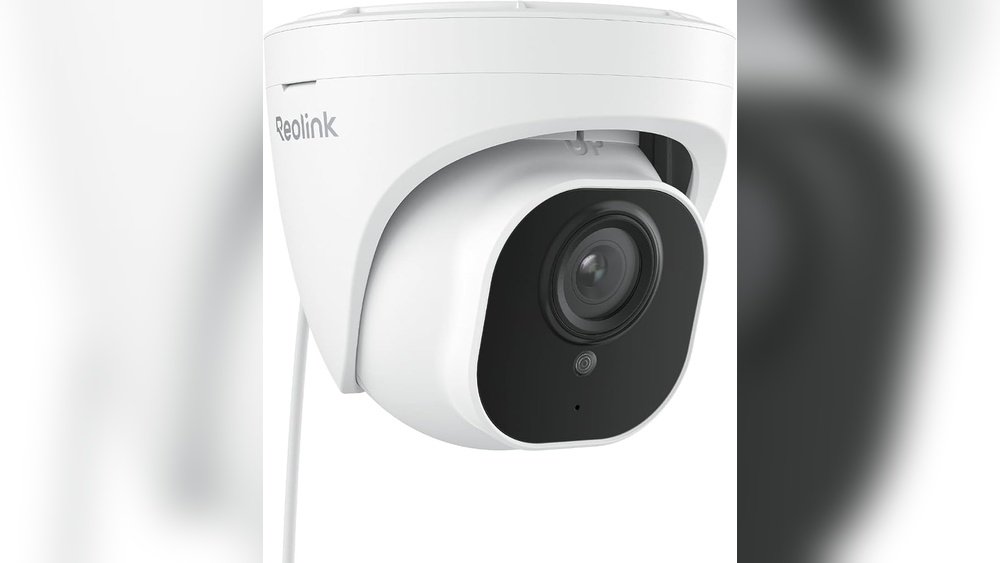
Smart security cameras are special cameras. They do more than just record video. They can connect to the internet. This means you can see what is happening at your home from anywhere. Using a phone or computer, you check the camera live.
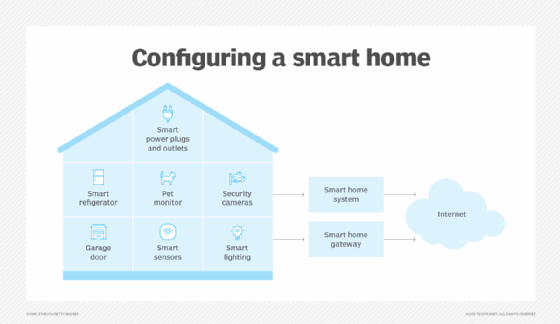
These cameras are part of smart homes. A smart home has many devices that talk to each other. For example, lights, locks, and cameras can work together. This makes your home safer and easier to control.
Credit: www.techtarget.com
How Do Smart Security Cameras Connect?
Smart cameras usually connect to your home Wi-Fi. Wi-Fi is a wireless network in your house. It lets your camera send video to your phone or cloud storage. This means you do not need wires to watch the video outside your home.
When you open the camera app on your phone, it talks to the camera through the internet. The camera sends live video to your phone. You can see what is happening right now. This is very useful when you are away.
How Do They Record Video?
Smart cameras record video in two main ways:
- On a memory card: Some cameras save videos on a small card inside the camera.
- Cloud storage: Many cameras send videos to online storage. This is called the cloud.
Cloud storage is useful because videos are safe even if the camera breaks. You can watch videos anytime on your phone.
How Do Smart Cameras Detect Motion?
One great feature is motion detection. Cameras can see if something moves in front of them. When they detect motion, they start recording or send an alert to your phone.
This helps you know if someone is in your yard or near your door. You do not have to watch the video all the time. The camera tells you when something happens.
How Do Smart Cameras Use Artificial Intelligence?
Many smart cameras use something called Artificial Intelligence (AI). AI helps cameras understand what they see. They can tell the difference between a person, a pet, or a car.
This means the camera can send alerts only when a person is near your home. It can ignore small animals or moving trees. This makes alerts more useful and less annoying.
How Do Smart Cameras Work With Other Devices?
Smart cameras can connect with other smart home devices. For example:
- When a camera sees a visitor, it can turn on smart lights.
- You can unlock a smart door lock if you recognize the visitor.
- Some cameras work with smart alarms to sound if there is danger.
This teamwork makes your home safer and smarter.

Credit: www.amazon.com
How Do You Control Smart Cameras?
You control smart cameras using apps on your phone or tablet. The apps are easy to use. You can:
- See live video anytime.
- Watch past videos saved on cloud or memory card.
- Set motion detection to send alerts.
- Talk through the camera if it has a microphone and speaker.
Some cameras also work with voice assistants like Alexa or Google Assistant. You can say, “Show me the front door,” and the camera video appears on your smart screen.
Are Smart Cameras Always On?
Smart cameras can work all day or only when you want. Many people set cameras to be active when they are away. This saves battery and data. When you come home, the camera may stop sending alerts.
You can also set cameras to record only at night or during certain hours. This way, you get the security you need without too many alerts.
How Do Smart Cameras Protect Your Privacy?
Privacy is important. Smart cameras use strong passwords and encryption. Encryption means the video is changed into a secret code. Only you can see the video, not strangers.
Always use a strong password for your camera app. Avoid easy passwords like “1234” or “password.” Change passwords often to stay safe.
What Are the Benefits of Smart Security Cameras?
Smart cameras offer many benefits, such as:
| Benefit | Explanation |
|---|---|
| Remote Viewing | Watch your home from anywhere using your phone. |
| Instant Alerts | Get notified right away if something moves near your home. |
| Easy Installation | No wires needed for most cameras; connect via Wi-Fi. |
| Integration | Works with other smart devices for better security. |
| 24/7 Monitoring | Keep an eye on your home all day and night. |
What Should You Consider When Buying a Smart Camera?
Before buying a smart security camera, think about:
- Video Quality: Look for cameras with clear video, at least 1080p.
- Night Vision: Make sure it can see well in the dark.
- Storage Options: Check if it uses cloud or memory cards.
- Motion Detection: See how good the camera is at detecting motion.
- App Usability: The app should be easy to use and reliable.
- Price: Compare prices to find one that fits your budget.
Summary
Smart security cameras are important tools in smart homes. They keep your home safe by sending live video and alerts. They connect to Wi-Fi and can be controlled from your phone. Motion detection and AI make them smart. They also work well with other devices in your home. Always protect your privacy with strong passwords and secure apps. When choosing a camera, look for good video quality and easy use. Smart cameras help you watch your home anytime, giving you peace of mind.
Frequently Asked Questions
What Makes Smart Security Cameras Different From Regular Cameras?
Smart security cameras connect to the internet and allow remote viewing. They have features like motion detection and alerts for better home safety.
How Do Smart Cameras Detect Motion And Send Alerts?
They use sensors to spot movement and send instant notifications to your phone. This helps you respond quickly to any activity at home.
Can Smart Security Cameras Work Without Wi-fi?
Most smart cameras need Wi-Fi to send live video and alerts. Some models offer local storage but still need internet for remote access.
Are Smart Cameras Easy To Install In Smart Homes?
Yes, most smart cameras come with simple setup guides and apps. You can usually install them yourself without special tools.