
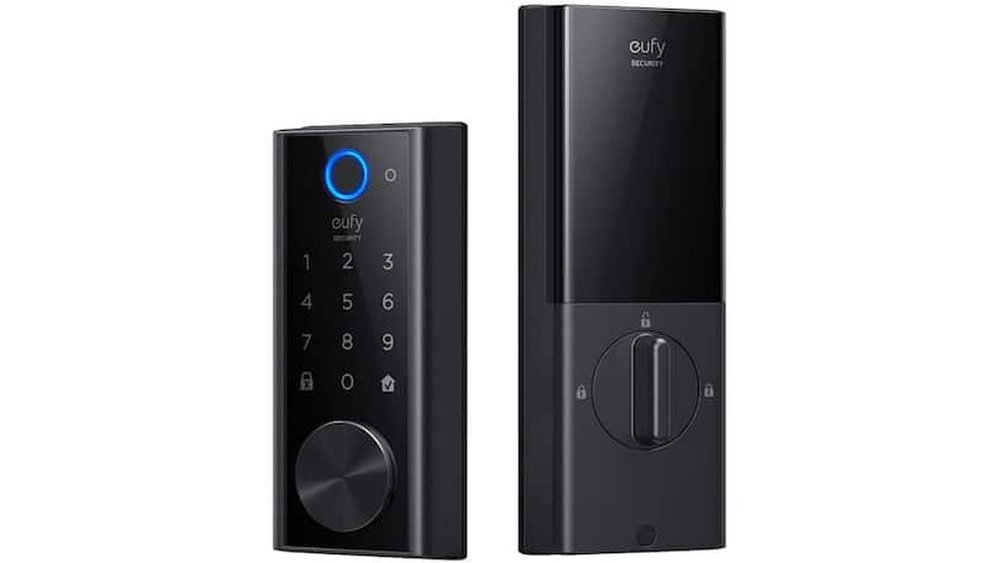
Smart locks are becoming more common in homes and offices. But what exactly are they? How do smart locks work? And most importantly, are they safe to use? This article will answer these questions in simple words.
What Is a Smart Lock?
A smart lock is a lock that you can control without a key. Instead of using a metal key, you use technology. You might use your phone, a code, or even your fingerprint to open the door.
These locks connect to the internet or your home Wi-Fi. This connection lets you control the lock from far away. For example, you can lock or unlock your door while you are not at home.

Credit: ipsamart.com
How Do Smart Locks Work?
Smart locks work using different methods. Here are the common ways to open a smart lock:
- Bluetooth: Your phone talks to the lock using Bluetooth. When you are close, the lock opens automatically or after you press a button.
- Wi-Fi: Some smart locks connect to your Wi-Fi. This lets you control the lock from anywhere, using an app on your phone.
- Keypad: You enter a special code on a keypad to open the door.
- Fingerprint: Some locks have a fingerprint scanner. They open only when they recognize your fingerprint.
- Voice Control: You can also use voice commands with assistants like Alexa or Google Assistant.
Most smart locks use one or more of these methods. They also have a traditional key option. This is for backup if the smart system fails.
The Main Parts of a Smart Lock
Smart locks have several important parts:
| Part | Function |
|---|---|
| Lock Mechanism | The part that physically locks or unlocks the door. |
| Electronics | Controls the lock and connects to your phone or network. |
| Battery | Powers the smart lock to work without wires. |
| Communication Module | Allows the lock to connect via Bluetooth, Wi-Fi, or other ways. |
| Keypad or Scanner | Lets you enter codes or use fingerprints to open the lock. |
Step-by-Step: How You Use a Smart Lock
Here is a simple example of using a smart lock with a phone:
- You download the lock’s app on your phone.
- You connect the lock to your Wi-Fi or pair it via Bluetooth.
- You create a password or set up fingerprints in the app.
- When you arrive home, your phone sends a signal to the lock.
- The lock opens automatically or after you press a button.
- You enter or leave your home without using a key.
It is easy and fast. You do not have to carry keys anymore.
Are Smart Locks Safe?
Safety is the most important question. Are smart locks safe for your home?
Smart locks have many safety features. But like all technology, they have risks.
Benefits Of Smart Lock Safety
- Strong Encryption: Most smart locks use encryption. This means they scramble the data to stop hackers.
- Access Control: You can control who can enter your home. You can give temporary access to friends or workers.
- Alerts: Many smart locks send alerts if someone tries to break in.
- Audit Trails: Some locks keep a record of who opened the door and when.
Potential Risks Of Smart Locks
- Hacking: Hackers might try to hack the lock if it has weak security.
- Battery Failure: If the battery dies, you may not open the door without a key.
- Technical Problems: Software bugs or connection issues can stop the lock from working.
- Privacy Concerns: Some locks collect data. This data could be misused if not protected.
How to Keep Your Smart Lock Safe
You can take steps to make smart locks safer:
- Use Strong Passwords: Avoid simple passwords. Use a mix of letters and numbers.
- Update Software: Keep the lock’s software up to date. Updates fix security problems.
- Use Two-Factor Authentication: Add extra security by requiring two steps to access.
- Check Battery Regularly: Change batteries before they die to avoid lockouts.
- Limit Access: Only give access to trusted people.
- Secure Your Wi-Fi: Use a strong password for your home Wi-Fi network.
Who Should Use a Smart Lock?
Smart locks are good for many people:
- People who lose keys often.
- Families with many members.
- Homeowners who want to check who enters their home.
- People who like new technology.
- Those who want to give temporary access to visitors or workers.
But smart locks may not be for everyone. If you worry about technology problems, a traditional lock might be better.
Comparing Smart Locks With Traditional Locks
| Feature | Smart Lock | Traditional Lock |
|---|---|---|
| Key Needed? | No, uses phone or code. | Yes, needs a physical key. |
| Remote Control | Yes, via app or internet. | No, must be at the door. |
| Access Sharing | Easy to share and remove access. | Must give physical keys. |
| Power Source | Needs battery or power. | No power needed. |
| Risk of Hacking | Possible if weak security. | No hacking risk. |

Credit: lockly.com
Final Thoughts
Smart locks work by using technology to replace keys. You can open doors with phones, codes, or fingerprints.
They offer many benefits, like convenience and better access control. But they also come with some risks.
Smart locks are generally safe if you follow security tips. Use strong passwords and keep the software updated.
If you want easy and modern door security, smart locks can be a good choice. Just remember to stay careful with your data and power.
In the end, smart locks give you new ways to protect your home. But no lock is perfect. Always use smart locks wisely.
Frequently Asked Questions
How Do Smart Locks Connect To Your Phone?
Smart locks usually connect through Bluetooth or Wi-Fi. This lets you lock or unlock doors remotely using an app.
Are Smart Locks Harder To Break Than Traditional Locks?
Smart locks often have stronger security features. They can be more difficult to pick or bump than regular locks.
Can Smart Locks Work Without Internet?
Yes, many smart locks work with Bluetooth, which doesn’t need internet. Some also have backup keys for emergencies.
How Do Smart Locks Keep Your Home Safe?
They use encryption to protect your data and access codes. This helps stop hackers from breaking in.