
Smart homes are becoming more common. Many people use devices like smart speakers, cameras, and lights. These devices make life easier and more fun. But they also come with risks. One big risk is privacy. Your personal data might not be safe. In this article, we will talk about the risks of smart home devices. We will also share easy ways to protect your data.
What Are Smart Home Devices?
Smart home devices are tools that connect to the internet. They let you control your home from a phone or voice command. Some common smart devices are:
- Smart speakers (like Amazon Echo or Google Home)
- Smart cameras and doorbells
- Smart lights and thermostats
- Smart locks and alarms
These devices can make your home more comfortable. But they also collect data about you and your habits.
What Is Data Privacy?
Data privacy means keeping your personal information safe. It stops others from seeing or using your data without permission. When you use smart devices, they collect information. This can be your voice, video, location, or habits. If this data is not protected, bad people might see it. This is a big problem.
Smart Home Privacy Risks
Here are some common privacy risks with smart home devices:
1. Hacking
Hackers try to break into your devices. They can watch your cameras or listen to your conversations. Sometimes, they use your devices to attack other computers. If your device is not safe, hackers may get access.
2. Data Sharing Without Your Knowledge
Some companies share your data with others. They might use it for ads or sell it. You may not know this is happening. This can feel like a big invasion of privacy.
3. Weak Passwords
If you use easy or common passwords, hackers can guess them. This gives them control over your device and data.
4. Unsecured Wi-fi Networks
Using smart devices on open or weak Wi-Fi lets others spy on you. They can steal your data or hack your devices.
5. Lack Of Updates
Devices need regular updates to fix security problems. If you do not update, your device stays open to attacks.
6. Voice And Audio Recordings
Smart speakers listen for commands. Sometimes, they record when you do not want them to. These recordings might be stored or shared.
7. Physical Safety Risks
If smart locks or cameras are hacked, someone could enter your home. This is a serious safety issue.
How To Protect Your Smart Home Data
Even with risks, you can keep your smart home safe. Here are simple tips to protect your privacy.
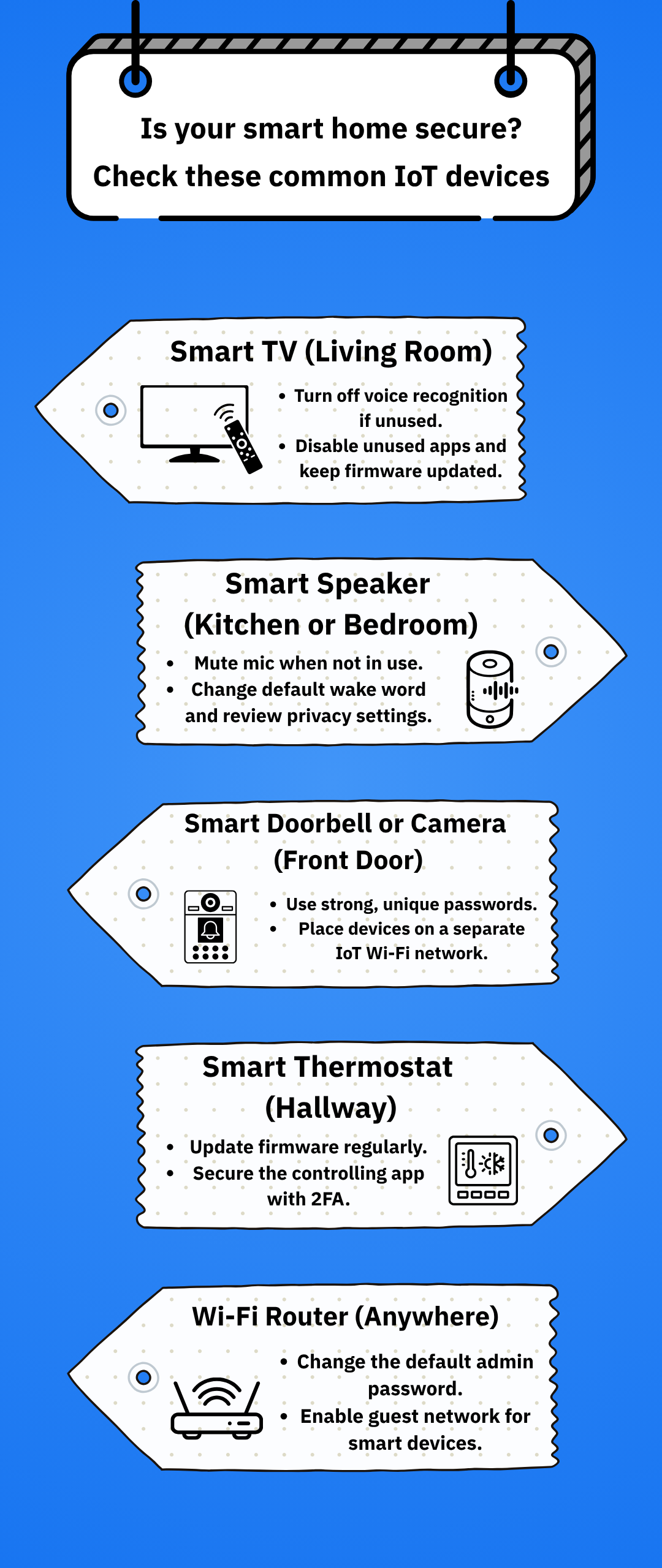
1. Use Strong Passwords
Use long passwords with letters, numbers, and symbols. Avoid simple words like “1234” or “password”. Change your passwords often. Do not use the same password for many devices.
2. Enable Two-factor Authentication
Two-factor authentication adds a second step to log in. You may need a code sent to your phone. This makes it harder for hackers to get in.
3. Keep Software Updated
Check for updates on your devices regularly. Updates fix security problems. Turn on automatic updates if possible.
4. Secure Your Wi-fi Network
Use a strong password for your Wi-Fi. Avoid public or open Wi-Fi for your smart devices. Change the default router password. Use WPA3 or WPA2 security for your network.
5. Limit Data Sharing
Read the privacy settings of your smart devices. Turn off data sharing if you can. Disable features you do not use, like voice recordings.
6. Review Device Permissions
Check which apps or devices have access to your data. Remove permissions that seem too open or unnecessary.
7. Turn Off Devices When Not In Use
If you do not need a smart device, turn it off or unplug it. This stops it from listening or collecting data.
8. Place Devices Carefully
Put smart cameras and microphones where they cannot see or hear private areas. This reduces the chance of unwanted recordings.
9. Use A Separate Network For Smart Devices
Some routers let you create a guest network. Use this for your smart devices. It keeps your main devices safer.
Credit: lockin.com
What to Do If You Think Your Smart Home Is Hacked
If you notice strange activity, act fast. Here are steps to follow:
- Change all your passwords immediately.
- Disconnect the device from the internet.
- Check for software updates and install them.
- Reset the device to factory settings if needed.
- Contact the device company for help.
- Consider using professional help if the problem continues.
Choosing Smart Devices With Privacy In Mind
When buying smart devices, think about privacy. Look for brands that:
- Have clear privacy policies.
- Offer good security features.
- Regularly update their software.
- Allow you to control data sharing.
Read reviews and user experiences before buying. This helps you pick safer devices.
Why Privacy Matters in Smart Homes
Privacy is about feeling safe in your own home. Smart devices bring convenience. But they must not take away your privacy. Protecting your data keeps your family and home safe. It also keeps your information from being misused. Everyone deserves privacy.
Credit: www.bitdefender.com
Summary
Smart home devices are useful but bring privacy risks. Hackers, weak passwords, and data sharing are main concerns. You can protect your data by:
- Using strong passwords and two-factor authentication.
- Keeping devices updated.
- Securing your Wi-Fi network.
- Limiting data sharing and reviewing permissions.
- Turning off devices when not in use.
Choose devices wisely and place them carefully. Always stay alert for unusual activity. Protecting your smart home privacy helps keep your life private and secure.
Frequently Asked Questions
What Are The Common Privacy Risks With Smart Home Devices?
Smart home devices often collect personal data that can be hacked or misused. Weak passwords and unsecured networks increase these risks.
How Can Hackers Access My Smart Home Data?
Hackers use weak passwords, unsecured Wi-Fi, or outdated software to breach smart devices. They exploit vulnerabilities to steal or spy on data.
Do Smart Speakers Listen To Private Conversations?
Smart speakers may activate by mistake and record sounds unintentionally. These recordings can be stored or sent to cloud servers.
Can I Control What Data My Smart Home Shares?
Yes, most devices let you adjust privacy settings to limit data sharing. Regularly review and update these settings for better control.