
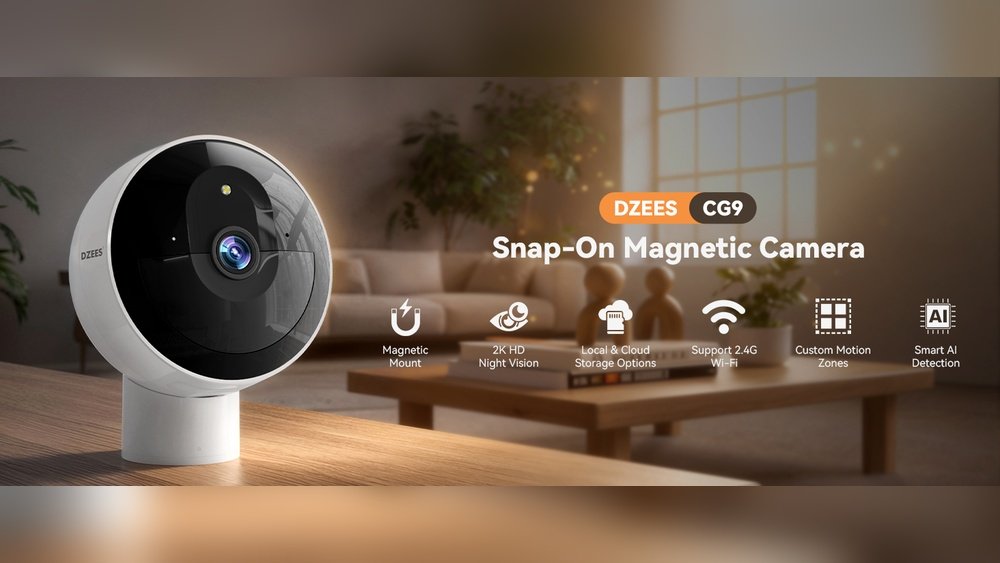
Keeping your home safe is important. Many people use security cameras to watch their homes. But many cameras ask you to pay every month for storage. This can be expensive and annoying. Some cameras offer storage without monthly fees. These are good if you want to save money.
In this article, you will find the best security cameras for home use. All of these cameras let you save videos without paying monthly. We will explain what to look for. Also, we will list some top cameras for you to choose from.
Why Choose Security Cameras Without Monthly Fees?
Most security cameras save videos in the cloud. Cloud means online storage. You pay a monthly fee to keep your videos safe there. But monthly fees add up. After one year, you may pay a lot of money.
Some cameras let you save videos on your own device. This can be a memory card or a hard drive. You pay once for the camera and storage device. Then, you don’t pay again. This is cheaper in the long run.
Also, saving videos locally means you control your data. No one else can see your videos except you. This can be better for privacy.

Credit: www.walmart.com
Features to Look for in Cameras Without Subscription Storage
When buying a security camera without monthly fees, look for these features:
- Local Storage: The camera should support a memory card or USB drive.
- Video Quality: Look for at least 1080p resolution for clear images.
- Night Vision: The camera must see well in the dark.
- Motion Detection: The camera should alert you when it sees movement.
- Easy Setup: It should be simple to install and use.
- Weatherproof: If you use the camera outside, it must resist rain and dust.
- Power Source: Check if it uses batteries, wires, or solar power.
- App Support: A good app helps you watch videos from your phone.
Types of Storage for Security Cameras Without Monthly Fees
There are two main ways to save your videos without paying monthly:
1. Microsd Card Storage
This is the most common local storage. The camera has a slot for a small memory card. You buy the card separately. When motion is detected, the camera saves video on the card.
Pros:
- Easy to use and replace.
- No internet needed to save videos.
- Cost-effective.
Cons:
- Cards can get full and overwrite old videos.
- If the camera is stolen, the videos may be lost.
2. Network Video Recorder (nvr) Or Digital Video Recorder (dvr)
These systems connect several cameras to one storage device. The device stays at your home and saves all videos.
Pros:
- Can manage many cameras at once.
- Large storage capacity.
Cons:
- More complex to install.
- Higher initial cost.
Top Security Cameras Without Monthly Subscription Storage
Here are some good cameras that let you store videos without monthly fees.
1. Wyze Cam V3
The Wyze Cam v3 is a small, affordable camera. It supports microSD cards up to 32GB. It has 1080p video quality and night vision. It works inside and outside. You can watch live video on the app.
Key Features:
- Local storage with microSD card.
- Colour night vision.
- Motion and sound detection.
- IP65 weather resistance.
- No monthly fee for basic use.
2. Reolink Argus 3 Pro
This wireless camera uses rechargeable batteries. It has 2K video quality. You can use a microSD card for local storage. It also has a siren and two-way audio.
Key Features:
- Supports microSD card up to 128GB.
- Clear 2K resolution video.
- Night vision with color.
- Weatherproof design for outdoor use.
- Works without subscription.
3. Eufycam 2c
EufyCam 2C comes with its own home base station. The base saves videos locally. It has 1080p video and night vision. The battery lasts up to 6 months. It is easy to install and use.
Key Features:
- Local storage on base station (16GB included).
- Motion detection alerts.
- IP67 weatherproof.
- No monthly fees for storage.
- Good battery life.
4. Amcrest Ultrahd 4k (ip4m-1026)
This wired camera offers very high video quality (4K). It supports microSD cards and NVR storage. It has night vision and is weatherproof. It needs power from wires, so installation may take time.
Key Features:
- 4K video resolution.
- Supports microSD cards and Amcrest NVR.
- Clear night vision up to 98 feet.
- Weatherproof for outdoor use.
- No subscription needed for local storage.
5. Blink Outdoor (with Local Storage Add-on)
Blink Outdoor cameras are wireless and easy to install. They use a Sync Module 2 to save videos locally. You need to buy the Sync Module separately. Without it, videos save in the cloud with fees.
Key Features:
- Wireless with two-year battery life.
- 1080p HD video.
- Sync Module 2 for local storage (sold separately).
- IP65 weather-resistant.
- No monthly fee if you use local storage.
How to Choose the Right Camera for You
Choosing the best camera depends on your needs. Here are some questions to ask:
- Do you want indoor or outdoor use?
- Do you prefer wireless or wired cameras?
- How many cameras do you need?
- Is easy setup important to you?
- Do you want the highest video quality?
- What is your budget?
If you want simple and cheap, a camera with microSD card is good. If you want many cameras and long storage, use an NVR system.
Tips for Using Security Cameras Without Subscription
- Always buy a good quality microSD card.
- Check your storage regularly to avoid overwriting.
- Keep your camera in a safe place to avoid theft.
- Use strong passwords for your camera app.
- Update the camera’s software when updates come.
- Place cameras where they cover important areas.
Credit: www.modemguides.com
Frequently Asked Questions
What Is A Security Camera Without Monthly Subscription?
A security camera without monthly subscription stores footage locally. You don’t pay extra fees for cloud storage or services.
How Do No-subscription Cameras Store Video Footage?
These cameras save videos on SD cards or local hard drives. This keeps your data private and accessible anytime.
Are No-subscription Security Cameras Reliable For Home Use?
Yes, they offer good reliability with proper setup. Local storage means no internet needed for recording.
Can I Access No-subscription Cameras Remotely?
Many models allow remote viewing via apps. You can watch live video without paying monthly fees.
Conclusion
Security cameras without monthly subscription storage can save money. They give you control over your videos. Many good cameras offer local storage with no extra fees.
Think about what you need before you buy. Check for local storage options and video quality. Consider battery life, weather resistance, and ease of use.
With the right camera, you can protect your home without monthly fees. Choose a camera that fits your budget and needs. Your home will be safer, and you will save money.