
As an Amazon Associate, we earn from qualifying purchases. This post contains affiliate links – if you buy through them, we may earn a commission at no extra cost to you.
Finding the best smart remotes for multiple devices is about finding the one that matches your specific home setup. These remotes differ primarily in how they handle device communication, such as IR, Bluetooth, or Wi-Fi, and whether they rely on a hub to bridge those signals. Your decision will depend on whether you need simple IR control for older gear or a complex hub-based system for a modern smart home. If you want a straightforward replacement for basic devices, look at the SofaBaton U3, while those managing a mix of smart streaming boxes and home automation will prefer the SwitchBot Smart Universal Remote.
| Best Choice | |||
| Preview |  |  |  |
|---|---|---|---|
| Product | SwitchBot Smart Universal Remote | SofaBaton X1S Universal Remote | SofaBaton U3 Universal Remote |
| Brand | SwitchBot | SofaBaton | SofaBaton |
| Best for | Best Overall | Best Hub-Based Control | Best Simple Interface |
| The listing says | Controls IR appliances and Bluetooth devices Supports 25 devices and 2.4GHz Wi-Fi | Supports over 6,000 brands and 500,000 devices Custom one-click activity macros | Supports IR, Bluetooth, and RF devices Global Macro button for complex commands |
| More information | Check Price on Amazon | Check Price on Amazon | Check Price on Amazon |
1. SwitchBot Smart Universal Remote with Hub Mini
Best for: Users who want to integrate IR appliances into an Apple Home ecosystem.
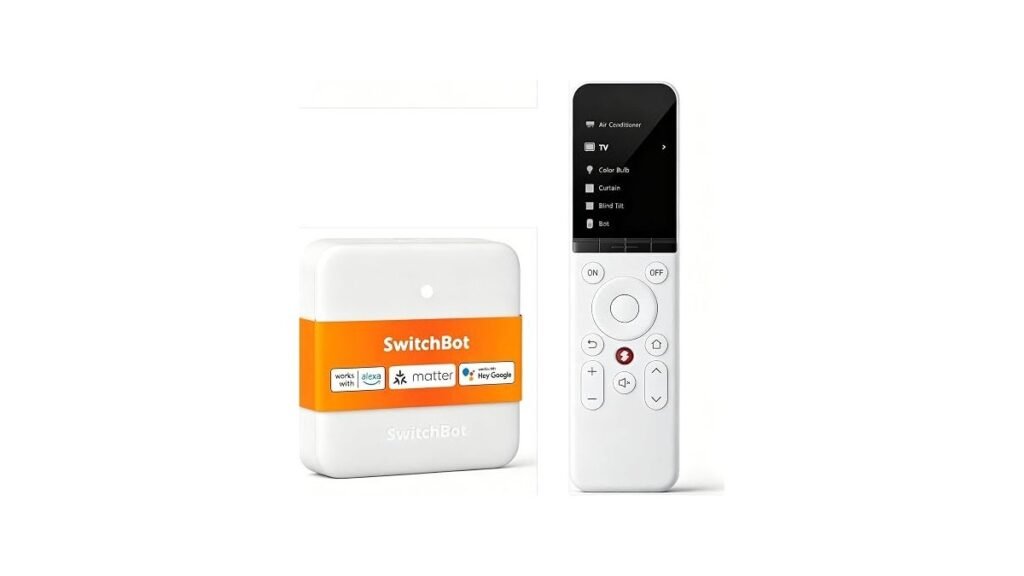
This remote is designed for those who need to consolidate traditional IR gear like air conditioners and TVs alongside modern Bluetooth streaming boxes. It handles up to 25 devices, allowing you to manage your home entertainment without juggling multiple plastic remotes. The 2000mAh battery is a standout feature, rated for up to 150 days of use.
The unit relies on a 2.4GHz Wi-Fi connection and requires a hub for advanced smart home features. It features 19 large buttons, making it a solid choice for families with children or elderly members. This remote isn’t for users who rely on RF-based remotes or third-party Bluetooth devices that fall outside its specific compatibility list.
Good if:
- You already use Apple Home for your smart devices.
- You need to control both IR appliances and Bluetooth TV boxes.
- You prefer a long battery life between charges.
Skip it if:
- You use a 5GHz Wi-Fi network exclusively.
- You rely on RF-based remotes for your entertainment setup.
2. SofaBaton X1S Universal Remote with Hub
Best for: Someone who wants to hide their hardware inside a cabinet.
The X1S uses a powerful hub to provide 360-degree control, meaning you don’t have to point the remote directly at your equipment. This is ideal for a clean living room look where you prefer to keep your media players or receivers tucked away. The system supports custom activities, allowing you to trigger multiple commands at once, such as powering on your TV, receiver, and cable box with a single button press.
This remote includes a “Find my remote” feature that emits a sound if you misplace it, which is a helpful addition for busy households. The interface is highly customizable, letting you set up virtual buttons on the remote’s screen for quick access to your favorite apps or specific menu sequences. It isn’t designed for users who want to manage a wide array of Wi-Fi smart home devices beyond Roku, Sonos, and Philips Hue.
Good if:
- You want to hide your media devices in a cabinet.
- You need voice control via Alexa or Google Assistant.
- You want to create complex “one-click” macro activities.
Skip it if:
- You have a large number of Wi-Fi-connected smart home devices.
- You prefer a remote with only physical buttons and no screen.
3. SofaBaton U3 Universal Remote Control
Best for: A user who needs a simple, tactile experience for many devices.
The U3 focuses on a straightforward interface that replaces up to 30 traditional remotes. It supports a wide range of IR, Bluetooth, and RF signals, making it one of the most versatile options for older and newer hardware alike. The inclusion of an “Air Mouse” mode allows you to navigate smart TV menus by simply waving the remote, which provides a more intuitive feel than clicking through directional arrows.
One unique feature is the ability to maintain simultaneous Bluetooth links with three devices, allowing you to switch between a soundbar and a streaming stick without any lag. It’s built to be a “set it and forget it” solution, provided your devices fall within its supported IR or Bluetooth categories. This remote isn’t for users who want to control Wi-Fi-based smart home devices or those who require deep integration with home automation platforms.
Good if:
- You want an Air Mouse feature for easier web browsing.
- You need to control RF-based equipment.
- You prefer physical buttons over screen-based menus.
Skip it if:
- You need to control Wi-Fi-connected smart home devices.
- You require native Apple TV or Fire TV integration.
Choosing the best smart remotes for multiple devices
All three of these remotes aim to replace the clutter of multiple controllers with a single, unified device. The SofaBaton X1S and U3 share a vast cloud-based database of codes, ensuring they work with a huge variety of brands. While the SwitchBot remote leans into smart home ecosystems, the SofaBaton models focus more on traditional entertainment hardware. They’re all effective at simplifying your media setup.
Still Not Sure?
How often will I really use the advanced features?
If you only need to turn your TV and soundbar on at the same time, a simple setup like the SofaBaton U3 is likely all you need.
What devices do I already own that this must work with?
Check if your gear uses IR, Bluetooth, or RF. For Apple Home users, the SwitchBot Smart Universal Remote is the most logical choice to bridge these different signal types.
What am I most likely to regret choosing?
Regret usually comes from choosing a remote that lacks the specific connectivity your devices need. Always verify if your streaming box is Bluetooth-compatible before buying the SofaBaton X1S.
Related guides
- 3 Best Smart Plugs for Outdoor Use: Our Top Picks in 2026
- 3 Best Smart Light Strips for Bedrooms: Our Top Picks in 2026
- 3 Best Smart Bulbs for Bedroom Ambiance: Our Top Picks in 2026
Frequently Asked Questions
Do these remotes require a constant internet connection?
Most of these remotes use the internet to download code libraries during setup. According to the Federal Communications Commission, maintaining firmware updates is important for the ongoing compatibility of your smart home devices.
Can I control my smart lights with these remotes?
It depends on the remote. The SwitchBot model works with Matter-enabled lights through Apple Home, while the SofaBaton X1S is limited to specific brands like Philips Hue via its app.
What happens if my device isn’t in the remote’s database?
All three remotes offer a learning function. You can point your original remote at the new one to copy specific buttons, ensuring you never lose functionality for older or niche equipment.
Are these remotes compatible with all TV brands?
They’re compatible with the vast majority of brands using standard IR or Bluetooth signals. If a specific model is missing, you can use the manual learning feature to add it.
Closing
Choosing the right remote comes down to your specific hardware mix and smart home needs. Use the SwitchBot Smart Universal Remote for Apple-integrated setups or the SofaBaton X1S for powerful hub-based control.
Pingback: 3 Best Smart Pet Feeders With Camera for Remote Monitoring in 2026 - nestsynq.com