
As an Amazon Associate, we earn from qualifying purchases. This post contains affiliate links – if you buy through them, we may earn a commission at no extra cost to you.
Finding the best smart buttons for home automation for your home depends on your existing setup and what you want to control. You must decide if you need a button to trigger software scenes, a physical pusher for mechanical switches, or a device that integrates with your current smart hub. These products differ primarily in their connectivity standards and physical form factors. If you want a versatile trigger for scenes, consider the Aqara Wireless Mini Switch; if you need to flip a physical switch, look at the SwitchBot Smart Switch Pusher.
| Best Choice | |||
| Preview |  |  |  |
|---|---|---|---|
| Product | Aqara Wireless Mini Switch | Philips Hue Smart Button | SwitchBot Smart Switch Pusher |
| Brand | Aqara | Philips Hue | SwitchBot |
| Best for | Best Overall | Best for Lighting Control | Best Mechanical Pusher |
| The listing says | Requires Aqara Zigbee hub Range within 400 inches of hub | Click to toggle lights or dim Time-based lighting function | Controls rocker switches and buttons App control with built-in timers |
| More information | Buy on Amazon | Buy on Amazon | Buy on Amazon |
1. Aqara Zigbee Wireless Mini Switch
Best for: Someone who wants a simple, versatile button for smart home scenes.
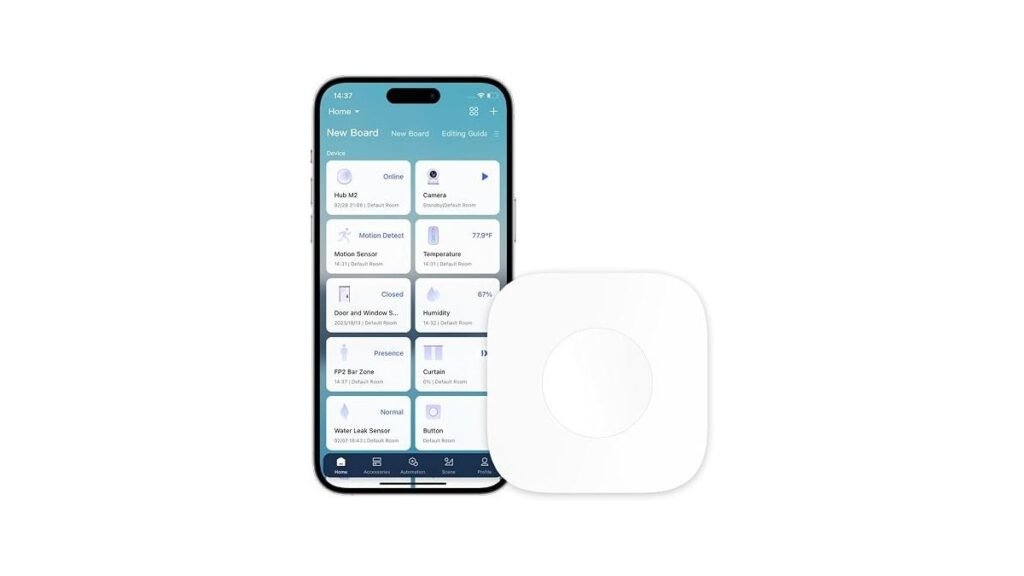
This button is designed for users already deep in the Aqara ecosystem. It offers three distinct control settings, allowing you to trigger different actions with a single press, double press, or long press. Because it uses the Zigbee protocol, you must have a compatible Aqara hub to make it work.
The device is small and portable, making it useful as an emergency alert or a doorbell. It isn’t for users who want a “plug-and-play” device that works directly with Wi-Fi routers, as it strictly requires the manufacturer’s hub for connectivity.
Good if:
- You want multiple control options from one button.
- You need an emergency button or a simple doorbell.
- You’re already using an Aqara hub at home.
Skip it if:
- You don’t want to buy or manage a separate hub.
- You use a different brand’s smart home ecosystem exclusively.
2. PHILIPS Hue Wireless Smart Light Switch Button
Best for: Users who want dedicated, reliable control over their smart lighting.
This button focuses on lighting, offering a way to turn lights on or off or cycle through scenes with a click. It includes a time-based feature that adjusts light settings automatically throughout the day, which is helpful for those who want their home to feel natural.
Mounting is flexible thanks to the included adhesive and magnetic back. It isn’t for users looking to control non-lighting devices, as its primary design and software integration are built specifically for the Hue lighting environment.
Good if:
- You want to dim or brighten lights with a press.
- You prefer a simple, magnetic mount for your buttons.
- You want automated scenes based on the time of day.
Skip it if:
- You need a button to control smart plugs or fans.
- You don’t have a Hue Bridge for your lights.
3. Switchbot Smart Switch Button Pusher (Bluetooth)
Best for: Someone who needs to automate an old, non-smart rocker switch.
This device is a mechanical “finger” that physically pushes a switch for you. It’s perfect for appliances or fans that lack smart capabilities, allowing you to keep your existing hardware while adding app control. You can set timers directly in the app to run routines without needing a hub.
Installation is straightforward, but you must ensure your switch is compatible, as it doesn’t work with toggle switches or stiff, aged buttons. It isn’t for users who want a sleek, invisible smart home solution, as the device sits visibly on top of your wall switch.
Good if:
- You have “dumb” switches you want to automate.
- You want to set schedules for fans or coffee makers.
- You prefer a tool-free installation using adhesive.
Skip it if:
- You have toggle-style switches or very stiff buttons.
- You want a button that blends into the wall decor.
How we picked the best smart home buttons
Most of these buttons share the goal of simplifying home automation, but they achieve it in different ways. The Aqara Wireless Mini Switch and Philips Hue Smart Button act as software triggers for smart ecosystems. In contrast, the SwitchBot Smart Switch Pusher is a mechanical solution that physically interacts with existing hardware.
If you’re choosing between them, your current smart home hub is the most important factor. For Aqara, you must use an Aqara hub; it won’t support hubs from other brands. If you opt for the SwitchBot, you can use local Bluetooth control alone. However, you must purchase a separate hub if you require voice commands or remote access. Always verify your hub’s compatibility before purchase to avoid connectivity failures.
Still Not Sure?
Do I really need a hub for these?
Most of these buttons require a hub to communicate with your network. The Aqara Wireless Mini Switch, for example, demands an Aqara-specific hub; it won’t work with hubs from other brands. The listing doesn’t mention if the arre Smart Button avoids the need for extra hardware.
Will this work with my existing light switch?
If you have a standard rocker switch, the SwitchBot Smart Switch Pusher is your best choice. It physically toggles the switch for you. Note that the SwitchBot isn’t for touch panels or stiff, aged buttons.
What happens if the button is out of reach?
Wireless buttons like the Aqara rely on your hub’s signal range. For a sturdy connection, ensure the switch is within 400 inches of the hub. Also, keep the hub and your router on the same local area network. If the device fails to trigger an action, check if the battery is depleted before troubleshooting your network settings.
Related guides
- 3 Best Smart Plugs for Outdoor Use: Our Top Picks in 2026
- 3 Best Smart Bulbs Compatible With Google Home Tested in 2026
- 3 Best Smart Light Strips for Bedrooms: Our Top Picks in 2026
Frequently Asked Questions
Can I use the THIRDREALITY ZigBee Smart Button with any hub?
This button is designed to work with specific Zigbee-compatible hubs like SmartThings, Aeotec, or Home Assistant. Ensure your current gateway supports the Zigbee protocol before purchasing to avoid compatibility issues during setup.
Does the Onvis Smart Button work with non-Apple systems?
The Onvis Smart Button is specifically designed for Apple HomeKit users. It utilizes Thread technology, which requires a compatible border router to function, making it an ideal choice for existing Apple home setups.
How do I mount the SwitchBot Smart Switch Pusher?
Use the provided adhesive to stick the device onto a clean, dry, and smooth surface near your switch. Allow the adhesive to bond for 24 hours before using the pusher for best results.
Is the arre Smart Button better for future-proofing?
The arre Smart Button supports Matter and Thread, which are modern standards designed to work across different smart home brands. The listing doesn’t mention if the arre Smart Button is future-proof.
These products offer different ways to manage your home. Use the Aqara Wireless Mini Switch for scene control or the SwitchBot Smart Switch Pusher for mechanical switches; check your hub compatibility today.
Conclusion
Choosing the right device doesn’t have to be complicated. Once you pick the one that fits your needs, you’ll find that controlling your lights and appliances feels much more natural. You shouldn’t hesitate to start with just one button to see how it improves your daily routine—you’ll love the convenience it brings.