
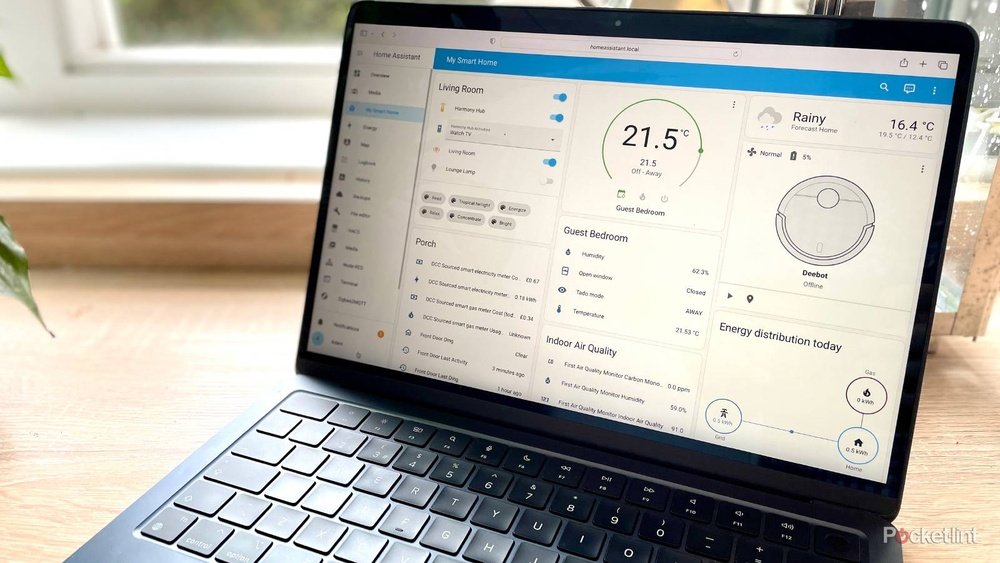
Have you ever wondered how to make your home smarter? How to control your lights, temperature, or security from one place? This is where Home Assistant comes in. It is a popular tool that helps you manage many smart devices in your home easily.
What Is Home Assistant?
Home Assistant is a free, open-source software. It runs on small computers like Raspberry Pi or on your home server. It connects all your smart devices in one app. This way, you can control them together instead of using many different apps.
It works with many brands and types of devices. For example, lights, switches, sensors, cameras, and thermostats. Home Assistant lets you see and manage all these devices in one place.
Why Use Home Assistant?
- Easy control: Control many devices from one app.
- Privacy: Your data stays at home, not in the cloud.
- Customization: You decide how your smart home works.
- Cost-effective: It is free and works on cheap hardware.
Many people like Home Assistant because it gives more control over their smart homes. It also keeps your information private and safe.
How Does Home Assistant Work?
Home Assistant works by talking to your smart devices. It uses many ways to connect, like Wi-Fi, Bluetooth, Zigbee, or Z-Wave. These are common wireless ways to make devices talk to each other.
When you turn on Home Assistant, it looks for devices in your home network. Then, it adds them to the system. You can see all devices on a dashboard, which is like a control panel.
Key Parts Of Home Assistant
| Part | What It Does |
|---|---|
| Core Software | The main program that runs everything. |
| Integrations | Connects Home Assistant to smart devices. |
| Dashboard (Lovelace UI) | Shows devices and controls on your screen. |
| Automations | Rules that make devices work automatically. |
| Add-ons | Extra tools to add features and apps. |
Setting Up Home Assistant
To start using Home Assistant, you need some hardware. The most common is the Raspberry Pi. It is a small, cheap computer. You install Home Assistant on it, and connect it to your home network.
After installing, you open Home Assistant on your computer or phone. It will guide you to add your smart devices. Many devices work right away. For others, you may need to add special settings.
Once devices are added, you can control them from the dashboard. You can turn lights on or off, check sensor readings, or see camera feeds.

Credit: www.pocket-lint.com
How to Use Automations in Home Assistant
One powerful feature is automations. Automations let your devices work without you touching them. You can create simple rules like:
- Turn on the lights when you enter a room.
- Turn off heating when windows open.
- Send a message if motion is detected at night.
Automations are made by setting triggers, conditions, and actions. For example:
| Trigger | Condition | Action |
|---|---|---|
| Motion sensor detects movement | Time is after 6 PM | Turn on the living room lights |
This means lights will only turn on when it is evening and motion is detected.
Devices Compatible with Home Assistant
Home Assistant supports many devices from different makers. Here are some examples:
- Smart bulbs and switches (Philips Hue, TP-Link, Lifx)
- Thermostats (Nest, Ecobee)
- Security cameras (Ring, Arlo)
- Smart locks (August, Yale)
- Sensors (temperature, motion, door/window)
It also works with smart assistants like Google Assistant or Amazon Alexa. So you can use voice commands too.
Benefits of Using Home Assistant
Many people choose Home Assistant for these reasons:
- Privacy: Keeps your data on your own devices.
- Control: You decide what your smart home does.
- Flexibility: Works with many brands and protocols.
- Cost: No monthly fees, just free software.
- Community: Large group of users help each other.
Because it is open-source, many people contribute new features. This means Home Assistant is always improving.
Challenges to Know
Home Assistant is powerful but not always easy to set up. You may need some patience and time. Learning basic computer skills helps.
Sometimes devices may not connect right away. You might need to check guides or ask for help in forums. But once set up, it works well.

Credit: www.home-assistant.io
Frequently Asked Questions
What Is Home Assistant Used For?
Home Assistant controls smart devices in your home. It helps automate lights, locks, and sensors easily.
How Does Home Assistant Connect Smart Devices?
It connects devices using Wi-Fi, Zigbee, or Z-Wave protocols. This allows different brands to work together.
Can Home Assistant Work Without Internet?
Yes, Home Assistant runs locally on your network. It does not rely on cloud services for basic functions.
What Hardware Is Needed For Home Assistant?
A Raspberry Pi or a small computer can run Home Assistant. A stable power source and network connection are also needed.
Conclusion
Home Assistant is a smart way to control your home devices. It gathers many smart tools in one place. You get privacy, control, and flexibility.
If you want to make your home smarter and easier to manage, Home Assistant is a good choice. It works with many devices and lets you create rules to automate tasks.
With some learning and setup, you can enjoy a smarter home that fits your needs. Home Assistant helps you do this without extra costs or complex systems.