

As an Amazon Associate, we earn from qualifying purchases. This post contains affiliate links – if you buy through them, we may earn a commission at no extra cost to you.
There’s no single best hub for every home; the right choice depends on your existing devices and how much you want to customize your automations. You must consider which wireless protocols your current sensors use, whether you prefer a plug-and-play experience or a deep DIY setup, and if you need local control for privacy. Products vary widely in their ability to bridge older equipment with new standards like Matter. If you want a simple, brand-specific setup, the Aqara Smart Hub M3 is a strong starting point, while those needing a powerful, multi-protocol engine should look toward the Hubitat Elevation C-8 Pro.
| Best Choice | |||
| Preview |  |  | 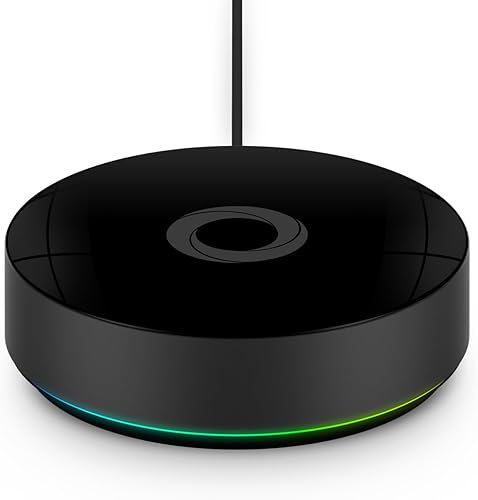 |
|---|---|---|---|
| Product | Aqara Smart Hub M3 | Hubitat Elevation C-8 Pro | Homey Pro |
| Brand | Aqara | Hubitat | Homey |
| Best for | Best Overall | Most Advanced Automation | Most Versatile Connectivity |
| The listing says | Supports Zigbee, Thread, and Matter bridge Prioritizes local control and automation | Runs automations locally for instant response Compatible with Alexa, Google Home, Apple HomeKit | Local-first hub with increased RAM Create automations using Homey Flow |
| More information | Check Price on Amazon | Check Price on Amazon | Check Price on Amazon |
1. Aqara Smart Home Hub M3
Best for: Someone who already owns Aqara sensors and wants a local-first bridge.
The Aqara Smart Hub M3 is designed for users who want to keep their automations running locally within the Aqara ecosystem. It supports up to 127 Aqara Zigbee devices and 127 Thread devices, making it a reliable choice for expanding a home built on these specific protocols. Its inclusion of an IR blaster allows you to control traditional air conditioners, turning them into smart devices that can be integrated into your scenes.
This hub is ideal for those who value privacy, as it excludes microphones and cameras while providing encrypted local storage for your data. However, it isn’t for users who rely heavily on non-Aqara Zigbee devices, as it doesn’t support third-party Zigbee hardware. If your home setup is centered on other brands, this hub’s limitations may hinder your connectivity goals.
Good if:
- You have many Aqara Zigbee or Thread devices.
- You want to control IR-based air conditioning units.
- You need a hub that supports Power over Ethernet.
Skip it if:
- You own many Zigbee devices from other brands.
- You need a hub that integrates with non-Matter smart ecosystems natively.
2. Hubitat Elevation C-8 Pro Smart Home Hub
Best for: The advanced user who wants complex, local-first automation without subscriptions.
The Hubitat Elevation C-8 Pro focuses on local processing, ensuring that your routines trigger instantly even if your internet connection fails. With support for Z-Wave 800 Series, Zigbee 3.0, and Matter 1.5, it acts as a central brain for a wide variety of hardware. The inclusion of two external antennas helps maintain a stable signal in larger homes or environments where many devices are competing for space.
The hub features an AI-assisted routine builder that helps you create automations without needing to write code, though the Rule Machine remains available for those who want deep, multi-condition logic. It isn’t for the casual user who wants a “set it and forget it” experience, as the advanced options may feel overwhelming if you aren’t interested in tinkering with your smart home configuration.
Good if:
- You want a local-first hub with no recurring fees.
- You have a mix of Z-Wave and Zigbee devices.
- You enjoy creating complex, layered automation routines.
Skip it if:
- You find technical setup and community-driven support intimidating.
- You prefer a simple, consumer-friendly mobile app interface.
3. Homey Pro (2026)
Best for: Users who need a single hub to connect many different brands and protocols.
The Homey Pro stands out for its broad compatibility, supporting seven different wireless technologies including Z-Wave Plus, Zigbee, and Thread. It’s built to connect over 50,000 devices from more than 1,000 brands, making it one of the most versatile hubs on the market. The interface allows you to create “Flows,” which are simple or advanced automations that link your devices together regardless of their manufacturer.
Because it supports such a vast array of hardware, it’s a great choice for a home with different brands. However, it may be overkill for a user who only owns a few devices or stays strictly within one ecosystem. If you don’t have a wide variety of equipment to manage, the complexity of the platform might be more than you actually require.
Good if:
- You have devices from many different manufacturers.
- You want to track your home’s historical energy usage.
- You need support for a wide range of wireless protocols.
Skip it if:
- You only use a handful of devices from one brand.
- You prefer a simpler, limited-scope hub for basic tasks.
Where These Overlap
These hubs all share a commitment to local processing, which keeps your data at home and automations running even when the internet is down. The Hubitat Elevation C-8 Pro and Homey Pro are the most similar, as both prioritize multi-protocol support. The Aqara Smart Hub M3 is more specialized, focusing on its own ecosystem while providing a bridge to Matter for broad compatibility.
Still Not Sure?
How often will I really change my home setup?
If you plan to add new devices frequently from various brands, the Homey Pro offers the most flexibility. It supports a large range of protocols to keep your options open for the future.
What do I already own that this must work with?
Check your current sensors and switches. If you have a house full of Aqara gear, the Aqara Smart Hub M3 is the most logical choice. For Z-Wave users, look at the Hubitat Elevation C-8 Pro.
What am I most likely to regret choosing?
You may regret choosing a hub that doesn’t support your specific wireless protocols. Always verify your current devices’ communication standards before buying, as each hub has different strengths in its supported hardware list.
Frequently Asked Questions
Which hub is easiest to set up for a beginner?
The Aqara Smart Hub M3 is generally the most approachable, as it uses “Magic Pair” technology to detect devices automatically. It’s designed for those who want a guided, simple setup.
Do I need a hub if my devices support Matter?
Matter is a communication standard, but you still need a controller to manage your devices locally.
Can these hubs work together in the same home?
Yes, you can use multiple hubs to cover different protocols or areas of your home. However, you should try to keep your primary automations on one hub to avoid conflicts between different systems.
Do these hubs require a monthly subscription?
None of these options require a subscription for basic functionality. Each hub focuses on local storage and processing, meaning your automations stay active without needing a paid cloud service or internet access.
For those wanting a deep, local-first system for many brands, the Hubitat Elevation C-8 Pro is a choice. If you prefer a simpler, brand-focused experience, start with the Aqara Smart Hub M3.
Conclusion
Choosing the right controller doesn’t have to be overwhelming. Start by auditing the gadgets you already own to see which ones might need a bridge to join your new network. You’ll find that once you’ve connected your first few devices, building a responsive, reliable smart home feels much more natural.