
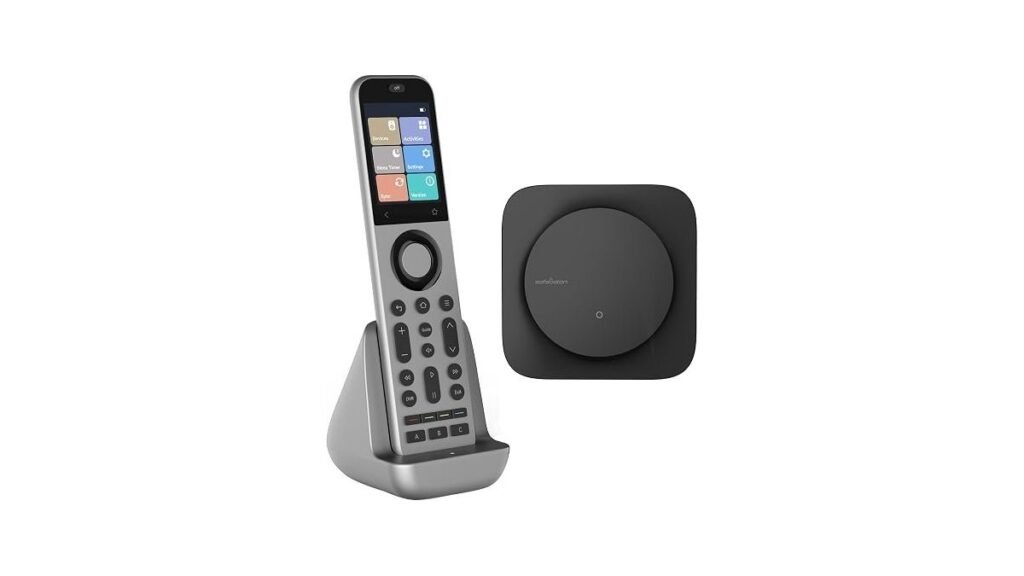
Finding the best universal smart remote depends on whether you want full home automation or simple tactile control. The main differences lie in how devices handle complex “Activities” and hub-based equipment. For a full-featured hub system, the SofaBaton X2 is the standout; if you prefer a simpler, button-focused experience, the SofaBaton U3 is the natural choice.
As an Amazon Associate, we earn from qualifying purchases. This post contains affiliate links – if you buy through them, we may earn a commission at no extra cost to you.
| Best Choice | |||
| Preview |  |  |  |
|---|---|---|---|
| Product | SofaBaton X2 | SofaBaton X1S | SofaBaton U3 |
| Brand | SofaBaton | SofaBaton | SofaBaton |
| Best for | Best Overall | Best for App Integration | Simplest to Use |
| The listing says | Controls IR, Bluetooth, Wi-Fi, and RF devices Supports Home Assistant and MQTT integration | Database supports over 6,000 brands Programmable one-click activity buttons | Supports IR, Bluetooth, and RF devices Programmable macros for multiple commands |
| More information | Buy on Amazon | Buy on Amazon | Buy on Amazon |
1. SofaBaton X2 Universal Remote with Touch Screen
Best for: Someone wanting a full-featured hub to control a complex home theater.
The X2 is designed for those who want to hide their equipment inside cabinets while maintaining total control. It uses a powerful hub that communicates via RF, meaning you don’t need a direct line of sight to your devices. The 2.4-inch HD touchscreen allows for intuitive navigation, while the included charging dock keeps the remote powered and organized.
This remote excels at creating complex “Activities” that trigger multiple devices at once. With its bidirectional integration, it works with Home Assistant for advanced users, and it supports voice commands via Alexa and Google Assistant. It isn’t for someone who dislikes using apps, as much of the initial setup and customization happens through the SofaBaton app.
Good if:
- You have equipment hidden in closed cabinets.
- You want to control smart home devices alongside media gear.
- You prefer a rechargeable remote with a dedicated dock.
Skip it if:
- You prefer a simple, non-touch screen remote.
- You aren’t comfortable using a smartphone app for setup.
2. SofaBaton X1S Universal Remote with Hub
Best for: Users who want deep app integration and flexible macro controls.
The X1S focuses on providing a modern, backlit experience for those who frequently watch TV in low-light environments. The raise-to-wake feature ensures the screen lights up as soon as you pick it up, and the “Find my remote” feature in the app helps you locate it if it slips between the cushions. It also features a unique scroll wheel for quick navigation.
The X1S is highly customizable, allowing you to add virtual buttons to the screen for specific menu commands or complex macro sequences. It integrates with IFTTT and iOS Shortcuts through its API, which is ideal for someone who enjoys tinkering with their home setup. It isn’t for users who want a strictly “plug and play” device without any technical configuration.
Good if:
- You often use your remote in dark rooms.
- You want to integrate your remote with IFTTT or shortcuts.
- You need the “Find my remote” feature to keep track of the device.
Skip it if:
- You don’t want to use an app for advanced customization.
- You find physical buttons more reliable than virtual screen commands.
3. SofaBaton U3 All-in-One Smart Universal Remote Control
Best for: A first-time buyer looking for a simple, tactile replacement remote.
The U3 is the most straightforward option, focusing on physical buttons and ease of use. It includes a built-in Air Mouse feature, which uses a gyroscope to let you control on-screen cursors with a wave of your hand. This is particularly useful for navigating streaming apps on smart TVs or media players.
While it supports macro functions, it doesn’t rely on the complex hub system found in the other models. It maintains simultaneous Bluetooth connections with up to three devices, making it a great fit for a standard TV and soundbar setup. It isn’t for users who need to control equipment located in different rooms or behind thick walls without an extra repeater.
Good if:
- You prefer the feel of physical buttons over touchscreens.
- You need an Air Mouse for easier streaming app navigation.
- You want a quick, easy setup for a few core devices.
Skip it if:
- You need to control equipment hidden in cabinets.
- You want advanced smart home automation or voice-controlled scenes.
Where These Overlap
The SofaBaton X2 and X1S are very similar in their reliance on a hub and their ability to handle complex home theater setups. Both offer app-based customization and voice control, making the choice between them a matter of preference for screen layout or button design. The U3 stands apart as a more traditional remote, lacking the hub but gaining the convenience of an air mouse.
Still Not Sure?
How often will I really use the smart features?
If you only watch one streaming service, the U3 is plenty. If you have a complex setup with multiple inputs and smart lights, you’ll likely prefer the SofaBaton X2.
What do I already own that this must work with?
Check if your devices are IR, Bluetooth, or Wi-Fi. The SofaBaton X2 and X1S offer the widest compatibility for hidden devices, while the U3 is perfect for standard setups.
What am I most likely to regret choosing?
Regret usually comes from picking a remote that’s too simple for your gear or too complex for your patience. If you want simplicity, choose the SofaBaton U3 today.
Choosing the right remote comes down to your setup complexity. For a high-end system with hidden gear, the SofaBaton X2 is the top pick; for a simple, tactile experience, choose the SofaBaton U3.
Related guides
- 3 Best Smart Bulbs Compatible With Google Home Tested in 2026
- 3 Best Smart Remotes for Multiple Devices: Our Top Picks in 2026
- 3 Best Smart Plugs With Scheduling Features for Your Home in 2026
Frequently Asked Questions
Does the remote work with my specific TV brand?
Most modern remotes are designed to work with a wide range of devices.
Can I control equipment hidden inside my entertainment cabinet?
Yes, the SofaBaton X2 and X1S use a hub that sends signals to devices through walls and cabinets. The U3 can also do this if you add the R1 repeater.
Is the setup process difficult for a beginner?
The SofaBaton app guides you through the process by brand and model. The U3 is generally the fastest to set up, while the X2 requires more time for custom activities.
Do these remotes require batteries or are they rechargeable?
The SofaBaton X2 includes a charging dock for a rechargeable battery. The other models generally use standard replaceable batteries, which offer a different type of convenience for long-term power needs.
Conclusion
Choosing the right controller doesn’t have to be a headache. Once you’ve picked the model that fits your living room setup, take a few minutes to organize your favorite channels and inputs. You’ll find that streamlining your entertainment makes relaxing at the end of the day much smoother than before.