
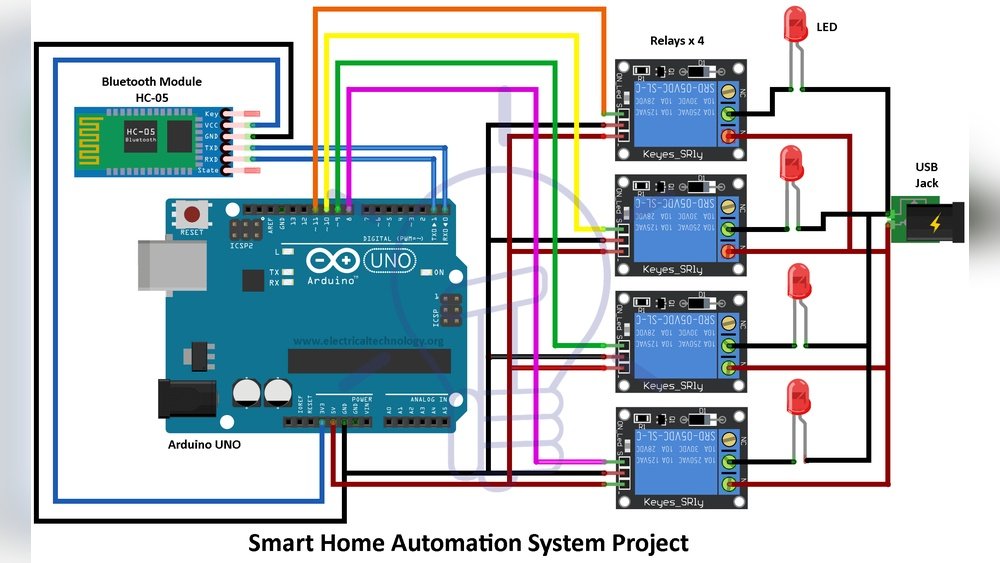
Smart home automation is becoming more common in many homes. But what is it? How does it work? And what is the logic behind it? This article will explain smart home automation logic in a simple way. You will learn how smart devices work together to make life easier.
What Is Smart Home Automation?
Smart home automation means using technology to control your home. You can control lights, temperature, security cameras, and more. All these devices connect and talk to each other. The goal is to make daily tasks easier and save energy.
For example, a smart thermostat can learn your schedule. It can lower the heat when you leave and raise it before you come back. This way, you save energy and stay comfortable.

Credit: www.amazon.com
How Does Smart Home Automation Work?
Smart home devices use a system to work together. This system uses rules and commands. It is like giving instructions to a robot. The robot then follows the rules to do tasks.
There are three main parts in smart home automation:
- Sensors: They detect things like motion, light, or temperature.
- Controllers: These are devices like smartphones or smart hubs that send commands.
- Actuators: These devices carry out actions. For example, turning on lights or opening blinds.
When a sensor detects something, it sends a signal to the controller. The controller then tells the actuator what to do. This process is called automation logic.
What Is Automation Logic?
Automation logic is the set of rules that control smart devices. It tells devices when and how to act. These rules are often based on “if-then” statements. For example:
- If motion is detected, then turn on the light.
- If it is 7 PM, then close the blinds.
- If the temperature is below 65°F, then turn on the heater.
These simple rules help devices work automatically. You do not need to control each device all the time. The devices follow the logic and make decisions on their own.

Credit: www.youtube.com
Types of Automation Logic
There are different kinds of automation logic you can use in smart homes. Here are a few common types:
| Type | Description | Example |
|---|---|---|
| Time-based Logic | Actions happen at certain times. | Turn on porch light at 6 PM. |
| Sensor-based Logic | Actions happen when sensors detect something. | Turn on lights when you enter a room. |
| Condition-based Logic | Actions happen if conditions are true. | Turn on heater if temperature drops below 65°F. |
| Location-based Logic | Actions happen based on your location. | Turn off lights when you leave home. |
How Devices Talk to Each Other
For automation to work, devices need to communicate. This happens in many ways:
- Wi-Fi: Many smart devices connect through Wi-Fi. This lets them talk to your phone or smart hub.
- Bluetooth: Some devices use Bluetooth for short-range communication.
- Zigbee and Z-Wave: These are special wireless networks designed for smart homes. They use less power and work well with many devices.
When devices communicate, they share data. For example, a motion sensor sends a message saying, “Motion detected!” The smart hub then tells the light to turn on.
Smart Home Hubs and Assistants
A smart home hub is a device that controls all other devices. It acts like the brain of your smart home. You can use a phone app or voice commands to control the hub.
Popular smart assistants like Amazon Alexa, Google Assistant, and Apple Siri can control many smart devices. They help you use voice commands to turn on lights, play music, or check the weather.
Examples of Smart Home Automation Logic
Here are some common examples to help you understand better:
- Morning Routine: At 7 AM, the blinds open, lights turn on, and the coffee maker starts.
- Leaving Home: When you leave, the system turns off lights, locks doors, and sets the alarm.
- Nighttime: At 10 PM, all lights turn off except night lights in the hallway.
These routines save time and energy. They also make your home safer and more comfortable.
Benefits of Smart Home Automation Logic
Smart home automation offers many benefits. Here are some key points:
- Convenience: You control many devices from one place.
- Energy Savings: Devices work only when needed. This saves electricity and money.
- Security: Automation can alert you to dangers and help protect your home.
- Comfort: Your home adjusts to your preferences automatically.
Things to Remember
Smart home automation is easy but needs some planning. You should think about:
- Which devices you want to connect.
- What rules or routines you want to set.
- How devices will talk to each other.
- Security of your smart home system.
Start small. Add more devices over time as you get comfortable.
Frequently Asked Questions
What Is Smart Home Automation Logic?
Smart home automation logic controls devices based on rules or conditions. It allows devices to work together automatically.
How Does Smart Home Logic Improve Energy Efficiency?
Automation logic can turn off lights and appliances when not needed. It helps reduce electricity use and saves money.
Can Smart Home Logic Work Without Internet?
Some smart home systems work offline using local networks. Others need internet to connect and control devices remotely.
What Types Of Devices Use Smart Home Automation Logic?
Smart lights, thermostats, security cameras, and locks often use automation logic. Many appliances can also be controlled automatically.
Conclusion
Smart home automation logic is the way devices work together. It uses simple rules to control your home. These rules help devices act automatically. They make life easier, safer, and more comfortable.
Understanding the basics of automation logic can help you use smart home devices better. Start with simple rules. Then, try more complex routines. Your smart home will become a helpful part of your daily life.