
As an Amazon Associate, we earn from qualifying purchases. This post contains affiliate links – if you buy through them, we may earn a commission at no extra cost to you.
Finding the best smart home hubs for beginners depends on how much you enjoy tinkering with tech versus wanting a system that just works. You must decide if you prefer an all-in-one ecosystem that handles everything automatically or a specialized piece of hardware that gives you total control over every signal. While some users want a simple app experience, others prioritize local processing to keep their home running even if the internet drops. Aeotec Smart Home Hub is the top pick for those who want broad compatibility, while Home Assistant is for the user who demands granular control over every automation.
| Best Choice | |||
| Preview |  |  |  |
|---|---|---|---|
| Product | Aeotec Smart Home Hub | SmartThings Hub 3rd Generation | Home Assistant |
| Brand | AEOTEC | Samsung SmartThings | XINCHENHA |
| Best for | Best Overall | Most Reliable Ecosystem | Best for Advanced Automation |
| The listing says | Connects thousands of compatible smart devices Builds custom automations via SmartThings app | Controls compatible devices via smartphone app Automates devices based on triggers | Designed for 24/7 home automation 64-bit Quad-Core Cortex-A53 processor |
| More information | Check Price on Amazon | Check Price on Amazon | Check Price on Amazon |
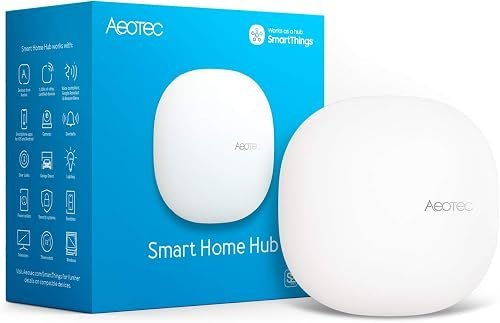
1. Aeotec Smart Home Hub
Best for: Someone who wants a plug-and-play experience with many different brands.
This hub acts as the center of your smart home, linking thousands of devices like lights, sensors, and switches. You can manage everything through the SmartThings app, which works on iOS, Android, and iPadOS. It supports major protocols like Zigbee, Z-Wave, and Matter, making it highly versatile for a starter setup.
The hub connects via Wi-Fi or Ethernet, giving you flexibility for your home network layout. Because it supports many automations locally, your routines often run faster and stay reliable even if your internet connection is weak. It isn’t for the user who wants to build a completely private, offline system without using cloud-based smartphone apps.
Good if:
- You have a mix of devices from different manufacturers.
- You want to use Alexa or Google Assistant for voice control.
- You prefer a setup that takes minutes rather than hours.
Skip it if:
- You’re uncomfortable using a cloud-based smartphone app.
- You require advanced programming that goes beyond standard smart home routines.
2. SmartThings Hub 3rd Generation (GP-U999SJVLGDA) Smart Home Automation Hub Home
Best for: A user who wants a proven, reliable ecosystem for home monitoring.
This hub is designed to keep your home connected through a single, easy-to-use smartphone app. It helps you automate devices so they react to your presence, such as lights turning on when you open a door. It’s built to coordinate a wide range of compatible products, making it a solid choice for those building a system.
The system relies on cloud-to-cloud protocols, which allows it to integrate with other popular smart home services. It’s a straightforward tool for users who want to see their home status at a glance.
Good if:
- You already own other Samsung SmartThings compatible devices.
- You want a simple way to monitor home activity.
- You need basic automation features for daily convenience.
Skip it if:
- You need to manage more than 100 devices at once.
- You want a fanless, compact device designed for continuous local processing.
3. Home Assistant
Best for: A tech-savvy beginner who wants to control everything themselves.
This hub is built for performance, featuring a 64-bit Quad-Core processor and 4GB of RAM. It operates silently without a fan, and its small size allows it to fit on any shelf or desk. It’s designed to run 24/7, keeping your automations active at all times.
Good if:
- You want a dedicated piece of hardware for your home.
- You need a system that runs quietly in a living room.
- You enjoy managing your own home automation platform.
Skip it if:
- You want a system that’s managed entirely through a standard commercial app.
- You prefer a simple, out-of-the-box experience without any setup steps.
Where These Overlap
Aeotec Smart Home Hub and SmartThings Hub 3rd Generation share a very similar software foundation, making them nearly identical in how they feel to a beginner. The choice between them usually comes down to the specific hardware connectivity you prefer. Home Assistant is in a different league, focusing on power and local control rather than the simplified app-based experience the others provide.
Still Not Sure?
How often will I really use it?
If you want to automate lights and locks daily without thinking about it, the Aeotec Smart Home Hub provides the most consistent, low-effort experience for a beginner’s home.
What do I already own that this has to work with?
Check your current devices for Zigbee or Z-Wave logos. If you have many of these, the Aeotec Smart Home Hub is likely the most compatible choice for your existing hardware.
What am I most likely to regret choosing?
You may regret choosing a system that’s too technical if you just want convenience. If you want a “set it and forget it” home, choose the SmartThings Hub 3rd Generation.
Related guides
- 3 Best Smart Switches for Older Homes: Our Top Picks in 2026
- 3 Best Smart Hubs for Multiple Ecosystems: Our Top Picks in 2026
- 3 Best Smart Buttons for Home Automation: Our Expert Picks in 2026
Frequently Asked Questions
Do these smart home hubs support Matter devices?
The Matter smart home standard is supported by the Aeotec Smart Home Hub, ensuring your future-proof devices work together. Other hubs may require software updates to gain similar compatibility.
Does the hub need to be plugged into my router?
The Aeotec Smart Home Hub offers both Wi-Fi and Ethernet options. Using Ethernet is often more stable, while Wi-Fi allows you to place the hub in a more central location.
Can I use these hubs with voice assistants?
Yes, the Aeotec Smart Home Hub and SmartThings Hub 3rd Generation are designed to work with Alexa and Google Assistant, letting you control your entire home using simple voice commands.
Is the Home Assistant setup difficult for beginners?
It’s best for beginners who are willing to learn the interface to gain more control over their devices.
If you value a simple, app-driven experience, choose the Aeotec Smart Home Hub. If you prefer high-performance, local control over your home’s automation, look closely at the Home Assistant hardware instead.
Conclusion
Choosing the right system doesn’t have to be overwhelming, so start small by picking one device you want to automate today. Once you’ve connected your first light or plug, you’ll see how simple it really is. Don’t be afraid to experiment; you’re going to love how much easier your daily routine becomes.